How Three Product Marketing Leaders Set Up Their AI Workflows
Sponsored by GetWhys AI can create the content. GetWhys helps you validate it.AI can draft a blog post, campaign brief, or set of sales battlecards before your coffee cools. But speed doesn’t tell you whether the content reflects what buyers actually care about. That’s the gap GetWhys fills. It validates your positioning and content against a proprietary database of real buyer interviews, with citations included. You can bring GetWhys an early idea and leave with content grounded in buyer intelligence. Through an MCP, GetWhys can also work inside the AI tools your team already uses. That means buyer validation can become part of your existing workflow, without adding another tab or disconnected tool. → Explore GetWhys’ buyer intelligence |
I've gone quiet for the last two months, and I want to tell you why.
I’ve been busy building the AI PMM Academy, which I introduced in my last newsletter and is now officially open for applications 🚀.
I talked about protecting your moat (the thinking, judgment, and relationship-building that actually make you valuable) and shared a practical framework for applying AI to product marketing workflows.
That newsletter led more than 100 of you to join the waitlist and complete my survey. I also spoke directly with several PMMs who were interested in the program. Gotta do my own buyer research, right? :)
Those conversations have directly shaped what I’ve built.
Today, I’m going to share three things:
How I think AI should be applied to product marketing
A look inside the AI systems powering workflows built by three experienced PMM leaders, who also happen to be the Academy mentors
More information about the first AI PMM Academy cohort
*A quick note before we dive in: the insights I'm sharing today are drawn specifically from the first two sessions of our 11-week program. This newsletter will give you the mental model and a few real examples. Inside the program, we'll go much deeper into how each component works, how to build it, and how to apply AI to your own PMM workflows, from research to launches and more.
Let’s get into it.
Why downloading another AI Skill usually doesn’t solve the problem
Most of the advice about AI and product marketing falls into one of two categories.
Highly prescriptive: here’s how to set up Cowork, here’s a content writing Skill, and here are the steps to follow.
Highly conceptual: here’s why AI matters, the mindset shift you need to make, and what the future of product marketing might look like.
Both are useful. But there is still a large gap between understanding what’s possible and making it work reliably inside your own company.
I saw this problem in my own experimentation, so I asked my LinkedIn community a simple question:
Are the AI Skills you’ve downloaded actually working for you?
The post generated more than 100 comments and replies.

The consensus was remarkably consistent:
Out-of-the-box Skills are useful for inspiration only. They can give you ideas, expose you to a better process, or provide a starting point. But they rarely work perfectly inside someone else’s company. For any Skill or workflow to work well, it needs to understand your:
Product, market, buyers, and internal language
Existing processes and how work moves between people and systems (internal logic)
Standards for what a trustworthy, useful output looks like
Reliability comes from testing and refinement - Longer instructions don’t automatically lead to better outputs. They can consume more context, create confusion, and make the workflow harder to maintain. The PMMs getting the best results weren’t creating one enormous instruction file. They were testing their systems on real work, identifying where the outputs broke, tightening the instructions, and adding clear verification steps and human checkpoints.
Successful builders begin with their own workflow - The most effective process I saw was:
Choose a repeatable task you already understand.
Build the first version around your existing process.
Test it through actual use.
Compare it with relevant third-party examples.
Incorporate only the ideas that meaningfully improve your system.
You need to understand the work before you can reliably turn it into a workflow.
This is especially important in product marketing, where so much of the work depends on judgment. AI can help you execute, analyze, and scale, but it still needs a strong PMM process underneath it.
The mental model behind the AI PMM Academy
The LinkedIn discussion and my waitlist survey reinforced two conclusions for me.
First, PMMs are experimenting with Skills, Cowork, connectors, Projects, and other tools, but many still lack a clear understanding of how these pieces work together.
Second, the most useful AI systems have to be built progressively around your company, expertise, and way of working.
That is the thesis behind the AI PMM Academy. We start by grounding you in the principles of good PMM work and showing you how the core Cowork building blocks fit together. Then you’ll build your own context layer and apply it across the actual PMM workflow, from research and positioning to launches, enablement, and measurement.
Let me give you a preview of that foundational layer.
Foundations of great product marketing
Great product marketers bring together three types of capability:
Core product marketing expertise
Visibility, influence, and emotional intelligence
Business judgment and strategic thinking
But the reality of the job rarely matches that expectation.
A significant amount of our time is consumed by busywork: meetings, coordination, context switching, formatting, information retrieval, and other repetitive work. That is the gray box in the visual below.
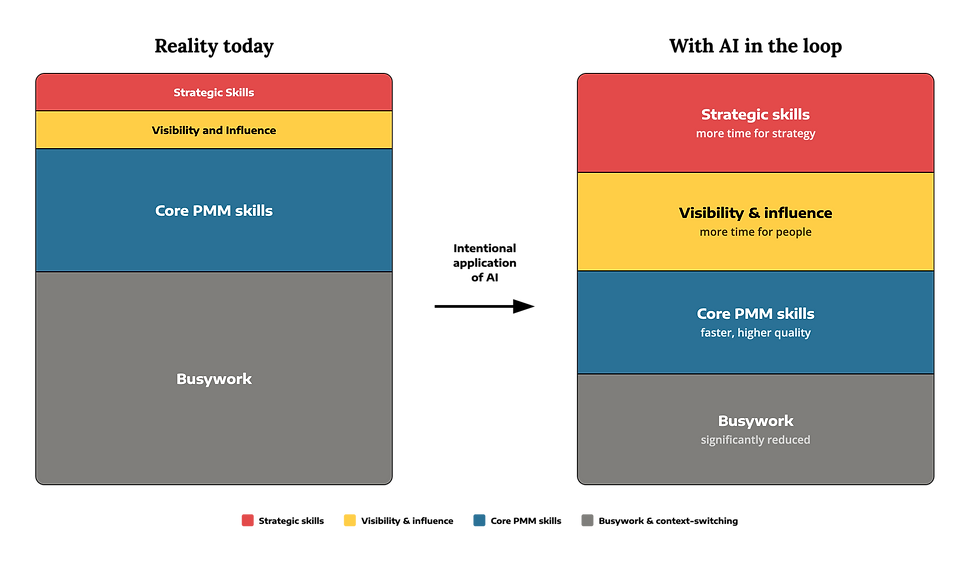
The initial goal of using AI is to reduce that gray box, and then enhance the quality of the work in the other boxes.
You want to move faster through the repetitive parts of your job so you have more capacity for the work that requires judgment, influence, creativity, and strategic thinking.
As your system becomes more reliable, you can also extend it beyond your individual work. Your team, sales organization, or broader company can begin benefiting from the expertise you’ve made more accessible and repeatable.
Why Claude Cowork is best for creating AI product marketing workflows
I’ve always said the thinking matters more than the tool. I chose Cowork because it’s the best environment for applying strong PMM principles to real work. (ChatGPT Work operates similarly, and many Skills are interchangeable, but most PMMs have access to Cowork at work, so that’s what we’ll use.)
Cowork helps move AI beyond a single conversation and makes what I described above possible through agentic workflows.
Instead of relying only on prompts and responses, Cowork can work through multi-step tasks, access relevant files and tools, and take actions within a defined process.
There are three core pieces to understand.
Connectors - Connectors allow Cowork to reach the tools, files, and information you already use. This helps it work with your actual business context instead of operating in a vacuum.
Skills - Skills are reusable sets of instructions that tell Claude how to perform a particular task or process. You don't have to explain the entire process again every time. Once the Skill has been built and tested, Claude can reuse those instructions and produce more consistent results. As mentioned above, many people get Skills wrong. The best Skills should be created from your manual workflow based on your context.
Context engineering - Context engineering is the practice of deciding what information Claude needs to do useful work. That might include your ICP, personas, positioning, product information, competitive landscape, voice principles, internal terminology, or examples of strong previous work. The challenge is giving Claude enough relevant context without overwhelming it with information it doesn't need.
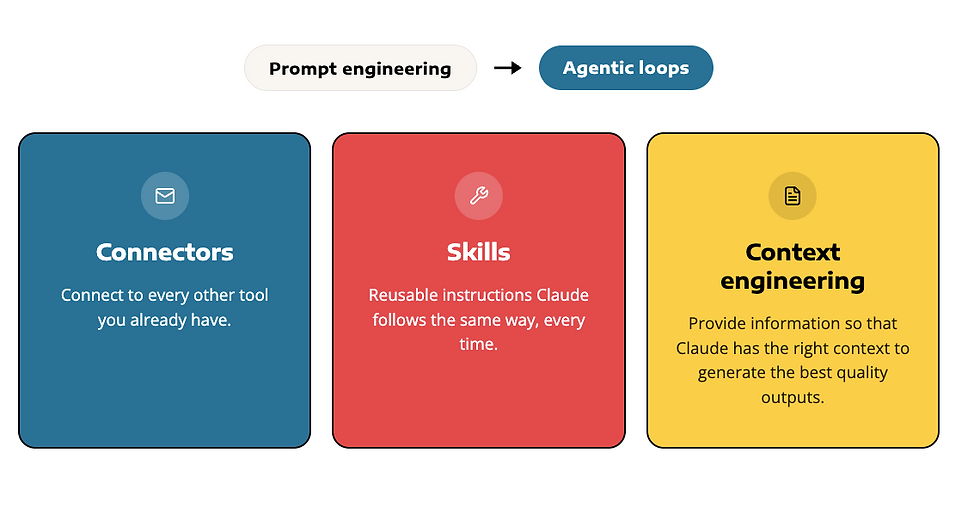
Together, these pieces give Claude a more consistent foundation for doing the work.
But the building blocks alone don't create a good system. You still need to decide:
- What problem is worth solving
- What context is actually relevant
- How the work should move from one step to another
- What Claude needs to verify
- Where human judgment still matters
This is where your PMM expertise and specific needs become essential.
How three experienced PMM leaders built their foundations
The right setup will look different depending on your company, role, product, operating model, and personal way of working.
That is why I don't believe there is one universal AI setup for product marketers.
To demonstrate this, I'm going to show you how the three AI PMM Academy mentors have built their foundations. They use many of the same components, including context, Skills, and connectors. But their final systems look distinct because they were designed to solve their specific problems.
A quick note on scope: I’ll be sharing just enough of the architecture to help you understand the business problem it solves, the reasoning behind the design choices, and the measurable impact it has delivered. During the Academy, the mentors will walk you much deeper into how the various pieces of their setups work together.
Mara Taylor: Building around productivity and alignment

Mara is an experienced founding product marketing leader who built the product marketing function at Kenjo, a workforce management platform that helps SMBs manage scheduling, time tracking, payroll preparation, and other HR operations.
Her setup began with a very human problem: attention.
Like many PMMs, Mara was moving between strategic projects, stakeholder requests, Slack conversations, meetings, collateral, and constant follow-up. The information existed, but it was distributed across too many places. Every time she returned to a project, she had to reconstruct what had happened and where she had left off.
The logic behind her setup
Mara built two connected layers.
The first is a personal productivity system that helps her capture and retrieve the context behind her work. The second is a company-wide marketing brain that makes Kenjo’s strategy, ICP, positioning, product information, and collateral more accessible and consistent across the organization.
This dual setup allows her to both improve her personal productivity and set up PMM workflows that can scale to other parts of the company.
Context
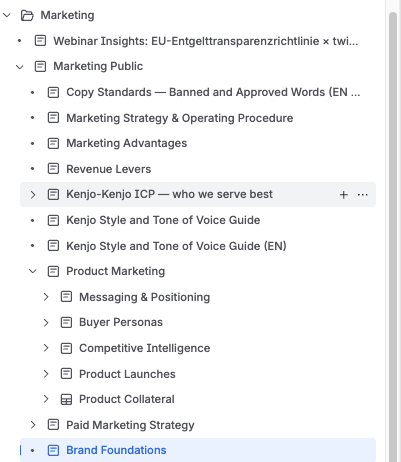
At the company level, the “Marketing Brain” contains:
ICP and market context
Marketing strategy
Positioning and messaging
Product information
Customer and sales insights
Approved collateral and brand standards
Example Connectors
Mara's setup has 20+ connectors. Here are a few:
ClickUp: Acts as Mara’s operating system for projects, tasks, and project context.
Slack: Provides the requests, conversations, and decisions behind the work.
Confluence: Houses the company-wide Kenjo Brain, including the marketing strategy, ICP, positioning, and other core PMM context.
HubSpot: Provides sales, pipeline, and win-loss data for strategic analysis.
Product code and roadmap: Help Mara understand product capabilities and represent them accurately in messaging and collateral.
Figma: Connects working files and final deliverables back to the original project context.
Example Skills
Mara's system has dozens of skills that are personal and shared. Here are a few.
Getting Things Done: Creates and updates ClickUp tasks while preserving the relevant source links, decisions, and project context.
End-of-Day Review: Summarizes completed work, upcoming priorities, and time spent on versus outside current projects.
Copywriting: Applies Kenjo’s brand standards, banned language, and “anti-slop” patterns to new content.
Kenjo Brain: Retrieves approved company, product, and marketing context from Confluence for use across new projects.
What this unlocks
Her productivity workflows allowed her to save a significant amount of time and reduced her context switching. This allowed her more time to make better strategic decisions for her organization.
For instance, while reviewing Kenjo’s ICP, Mara connected Claude to HubSpot data and did some quick win-loss analysis that showed that the company’s planned focus on one specific sector was underperforming, while another sector was showing much higher win rates. She successfully brought the evidence to sales, marketing, and leadership to reconsider the company’s direction.
What we’ll explore inside the Academy
Mara will help us explore how to reduce context switching, build sustainable personal AI systems, and decide which parts of our work should remain intentionally human.
We’ll also examine how these systems can extend beyond individual productivity into stronger team output, cross-functional alignment, AI adoption, and data-informed strategic decision-making.
Natalie Marcotullio: Building around repeatable problems
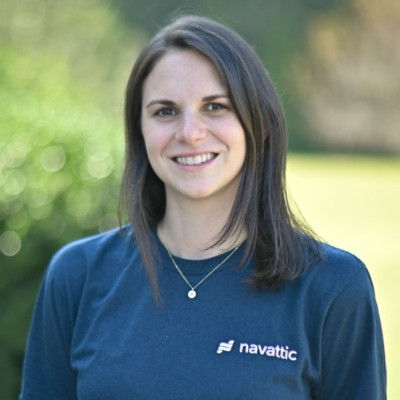
Natalie Marcotullio is the VP of Marketing at Navattic, a demo automation platform that helps SaaS companies create interactive and AI-guided product experiences for buyers. She has helped build the marketing organization from the company’s early stages. Her setup reflects the way she approaches AI: she experiments, identifies problems that keep recurring, and then decides which ones are worth turning into reusable systems.
The logic behind her setup
Navattic has several products, personas, and types of launches. Creating a new piece of content often requires pulling information from product documents, finding the right customer evidence, identifying the relevant persona, and applying the company’s brand guidelines.
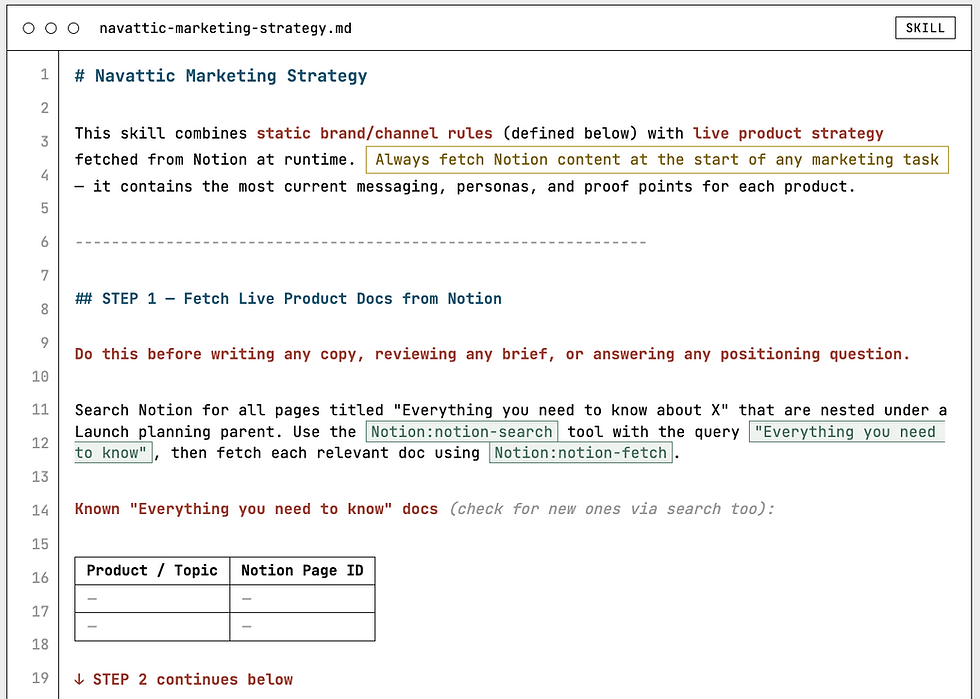
Natalie created a central Marketing Strategy Skill that brings this context together and provides a consistent foundation for the rest of the team.
Context
The most important contexts are all saved within the company's Notion site, and they include:
Company and marketing strategy
Product information and launch messaging
The relationship between each product and target persona
Brand voice and writing guidelines
Approved customer quotes and stories
More than 1,000 G2 reviews
Much of this information stays in the Notion systems where the team already maintains it. The Skill retrieves the most current context rather than relying on one large, static document.
Example Connectors
Natalie's system connects to more than 30 different tools. Here are a few:
HubSpot: Leads and MQL data.
Salesforce: Opportunities, customer records, and event contacts.
Linear: Product tickets, launch information, completed features, and internal demo requests.
Slack: Lead activity, event notes, internal updates, and drafted team communications.
Navattic: Demo performance, top-performing demos, and newly created demos.
Sanity: Navattic’s CMS, including customer quotes, case studies, blog content, and article updates.
Customer.io: Launch emails, in-app messages, and existing campaign automations.
These connections allow the system to work with real product and customer information while reducing the risk of inventing quotes or using outdated messaging.
Example Skills
Natalie's system has 15 skills. A few examples of what Natalie has built:
Marketing Strategy brain: Pulls live product messaging from Notion and customer proof from Sanity and G2, giving her other workflows a consistent foundation.
Weekly Pipeline Analysis: Cross-references Ahrefs, Profound, HubSpot, and Salesforce to calculate weekly changes and flag significant swings.
SEO and GEO Report: Reviews search and AI visibility, identifies underperforming content, and drafts recommended updates for Natalie’s approval.
P2 Launch Creator: Duplicates an existing Customer.io campaign and drafts the email and in-app messaging for a new feature.
Event Follow-Up: Finds event contacts across Vitally and Salesforce, then drafts customer emails or internal CSM notes for review.
Customer Newsletter: Pulls recent product updates from Notion and Linear, lets Natalie select the stories, and turns them into a monthly or quarterly draft.
What this unlocks
Natalie’s system allows people across the marketing team to create stronger work without needing to begin with an empty chat or ask product marketing to locate every piece of context.
It also gives Natalie more time for creative experimentation. That reclaimed time creates room for projects like Navattic’s digital customer scrapbook to be used for their upcoming major agentic product launch. Natalie used AI to plan the experience, structure the customer data, help build the website, and create a working prototype.
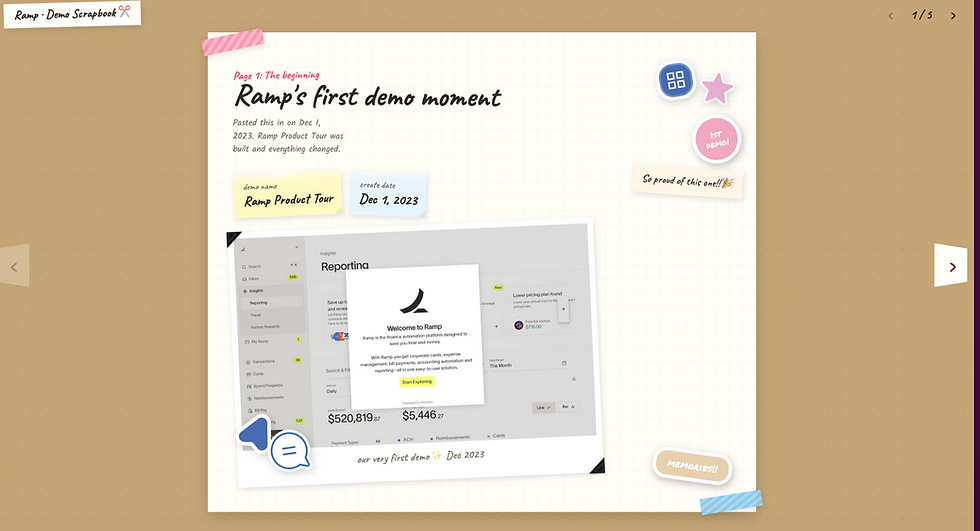
The value of the system shows up in both directions: routine execution becomes easier, and the team gains more capacity for work that is creative, differentiated, and difficult to standardize.
What we’ll explore inside the Academy
Natalie will help us explore how to identify recurring team-wide problems that are worth systematizing, build reusable Skills around them, and apply AI across launches, customer storytelling, content creation, and cross-functional execution. Her role as marketing leader gives a unique lens into where we can amplify results beyond PMM to the entire marketing team.
We’ll also examine how to preserve experimentation and creativity as more of the repeatable work becomes easier. Natalie has built a really strong and authentic personal brand around the innovative product marketing and marketing work she has done.
Mike Hetrick: Building for trust and quality at scale

Mike brings more than 20 years of experience across engineering and product marketing. He previously led the global PMM team for Tableau’s $1B enterprise analytics platform at Salesforce. Today, he is building product marketing from the ground up as a founding product marketing leader at Meta Integration Technology, Inc., an enterprise metadata management provider that helps organizations connect, catalog, govern, and understand data, analytics, and AI.
He also began his career as a data engineer, which becomes very obvious when you look at how he has approached his AI setup. 😉
The logic behind his setup
Mike’s central problem was how to build an AI system that has the right guardrails in place. His company had decades of knowledge distributed across different files, and outdated information could easily find its way into new AI-generated work.
He approached the solution like infrastructure: create a governed source of truth first, by building a really strong context layer, then designing workflows on top of it.
Context
Mike keeps what's true (facts), what's allowed (process/rules), and what it sounds like (voice) in different documents, because each changes on a different cadence and breaks in a different way if it drifts.
Company facts and business strategy
Marketing strategy and 12-month plan
Positioning, messaging, and platform narrative
Personas and audience-specific context
Launch plans and narratives
Voice, style, and editorial standards
Mike stores this context in a version-controlled repository using Github, which allows him to update information at the source and track what has changed.
He then uses Obsidian to provide him a visual map of how the different parts of the marketing brain (i.e., the context layer) relate to one another.
Example Connectors
Google Drive and Notion provide access to working documents.
Exa supports deeper web research and voice-of-the-practitioner analysis.
Firecrawl monitors and compares competitor websites.
Example Skills
An editorial process audits content against approved claims, banned language, required terminology, embargoed names, and brand standards.
A Persona Council reviews content from the perspective of four different buyers.
Additional Skills use the company context to produce and refine content consistently.
What this unlocks
With this foundation in place, Mike can scale his content without lowering the quality bar. He is building an entire content engine capable of producing one substantive blog every week through the end of the year, with every piece checked against the company’s approved messaging, editorial standards, and buyer personas.
The same system also helps him monitor more than 200 companies and identify when competitors change their positioning, messaging, or website language.
What we’ll explore inside the Academy
Mike will help us examine how to build a trustworthy context layer and apply it across competitive intelligence, positioning, messaging, persona validation, and scalable content creation.
Summary
Mike, Natalie, and Mara use many of the same building blocks, but they have created three different systems. Their systems emerged from the work they were already doing.
They were created from asking questions such as:
- What problem in my work is worth solving?
- What context does AI need to help me solve it?
- What part of the process should become repeatable?
- Where does a human checkpoint matter?
- What should I deliberately keep manual?
- How will I know whether the system is improving my work?
That is the kind of AI fluency I want to help PMMs develop.
It means knowing how to design the right system around the work you're actually trying to do, even as the tools continue to change.
You don’t have to AI alone: Join the AI PMM Academy
I hope these examples have piqued your curiosity and given you a glimpse into what we’re going to cover in the AI PMM Academy. I also hope they’ve inspired you to think about AI for product marketing the way I teach it: by starting with the core product marketing principles and problems to solve, and determining your AI strategy from there.
I built the AI PMM Academy very deliberately to be small, cohort-based, and example-driven, because however advanced someone’s setup is, this IS still new, and we ARE still all learning, and the best way to do that is to learn from one another.
I say it all the time, but it bears repeating: AI is the tool, not the outcome. Its purpose is to offload the busywork so you can focus on the best parts of being a product marketer. And that’s exactly what this program will do.
In just a few months, you could be operating in a setup like Natalie’s, Mara’s, or Mike’s – and the AI PMM Academy will get you there.
Yi Lin 💜